
Name-Based Case Searches
The state's free tool is Kansas CaseSearch, which covers public district and appellate case information. To hunt for a Riley County party, set the court to District, choose Party Name as the search type, and type Riley in the county field when it appears. A broad name can return too many hits. Narrow it with a case type or a filing-date range only then.
- Open CaseSearch and accept the public-access terms.
- Choose District, then Party Name. Enter the party search term.
- Select Riley County and expand Additional Search Filters if needed.
- Choose Criminal, Civil, Family, or Probate or Mental Health, and set filing dates when known.
- Complete the human check, select Search, and compare the full case number, type, judge, and dates before opening a match.
One caution from the portal itself: internet information is not the official court record. Common names also collide, since similar entries can belong to different people. Check several public fields to confirm a match, then get an official copy from the clerk-held file.
| Field | Type | Required | Riley use |
|---|---|---|---|
| Court | Dropdown | Yes | Choose District for Riley County District Court. |
| Search Type | Dropdown | Yes | Case Number, Party Name, Business Name, Party As Business Name, or Citation Number. |
| Search Term | Text | Yes | Enter the value that matches the chosen search type. |
| County | Dropdown | Conditional | Select Riley from the statewide location list. |
| Additional Filters | Controls | No | Case type, DOB, File Date From, and File Date To. |
| Human check | Challenge | Yes | Must clear before the Search button is enabled. |
Five Riley County Docket Search Types
CaseSearch currently offers five public search modes. These are Case Number, Party Name, Business Name, Party As Business Name, and Citation Number. Choose the narrowest field you actually know. For a traffic matter, a citation number often beats guessing. It spares you from guessing how a defendant's name was entered. A business search is its own mode, separate from a person's party-name search.
The County control is not a Riley-only database. It is a statewide selector, with Riley listed among Kansas locations. Leave the location broad and you may pull cases from other counties. Picking District does not reach Manhattan Municipal Court either. That city runs its own vendor portal for municipal traffic and ordinance matters.
Note: Payment sites are not docket-search systems. A payment receipt never replaces a case disposition or certified entry.
Case Number Searches
A newer Riley District Court case number usually carries the county prefix. It also carries the filing year, a case-type code, and a sequence number. The official format example is RL-2019-CR-000001. Type the whole number if you have it. That beats a common name for precision. It also helps the clerk pull an older file fast.
One wrinkle: cases filed before Riley's August 5, 2019 system transition may lack the RL prefix. They can look like 2019CV25 or 2019-CR-000001. If an older number fails, try that older layout. Never alter the case type or the digits just to force a match.
- CR
- Criminal case.
- CV
- General civil case.
- DM
- Domestic or family matter.
- LM
- Limited civil action.
- TR
- District-court traffic case.
Riley County Docket Search Before 2019
Think of August 5, 2019 as the dividing line for Riley County docket search work. Official Riley guidance ties that date to the Kansas eCourt transition. Newer case numbers carry the RL county prefix and standardized segments. Older public files may still show case information online. Their filed documents may live only at the courthouse.
This is a technology boundary, not a public-access boundary. A missing image from an older case does not prove the document is sealed. Try both number formats, then use the public terminal at 100 Courthouse Plaza. Do you need a public copy? Ask the Clerk of District Court for the correct request route.
Case Search Results Explained
A public result can separate one case from another and help you trace a setting. How much detail appears depends on the case type, the date, the privacy rule that applies, and whether a document went into eCourt.
| Case number | The court's identifier and best key for a later search or request. |
|---|---|
| Case type | The broad category, such as criminal, civil, family, or probate or mental health. |
| Parties and attorneys | Public names and roles when the access rules allow them. |
| Judge | The assigned judicial officer shown in public case information. |
| Hearing dates | Public event information that should be checked against a current notice and schedule. |
| Status and events | System labels and chronological activity, not legal advice or a certified conclusion. |
| Documents | Some post-transition public filings may be available, while older or restricted material may not be online. |
For the complete settings-only view, check the result against the Riley County court schedule. That report lists court date, time, judge, room, and setting type. It does not give a full event history.
Riley County Docket Search Human Check
The current form sits behind a Cloudflare human check. The button may read “Human check...” until verification clears. If it stalls, reset the form. Make sure the required Court, Search Type, and Search Term fields are complete, and try the official portal again. Bookmark the branded CaseSearch address rather than any alternate application endpoint.
A stubborn gate does not close off public access. Use the courthouse terminal. The state says it can display public information and records absent from the web portal. The Riley clerk can explain terminal and copy procedures. County guidance does note that Kansas court staff do not run general searches by phone.
Two Ways to Search: County and State
Riley County District Court feeds the statewide CaseSearch layer, and Riley also publishes a county settings PDF. The two answer different questions rather than duplicating each other.
| Channel | Coverage | Best use |
|---|---|---|
| Kansas CaseSearch | Public district and appellate case information across Kansas, filtered to Riley when selected | Locate a case by name, number, business, or citation and read available events. |
| Riley Court Dockets PDF | Riley County District Court upcoming settings | Find a date, time, judge, room, type, and access note. |
| Courthouse terminal | Public Riley court material that may be broader than internet access | Older records, documents absent online, and verification in the court system. |
| Manhattan municipal portal | Manhattan city ordinance and municipal traffic cases | Search by name, citation, docket, police case, or vehicle plate. |
Riley County Docket Search Form
The CaseSearch form shows the public-facing controls, the Riley county selector, the additional filters, and the human-check state.
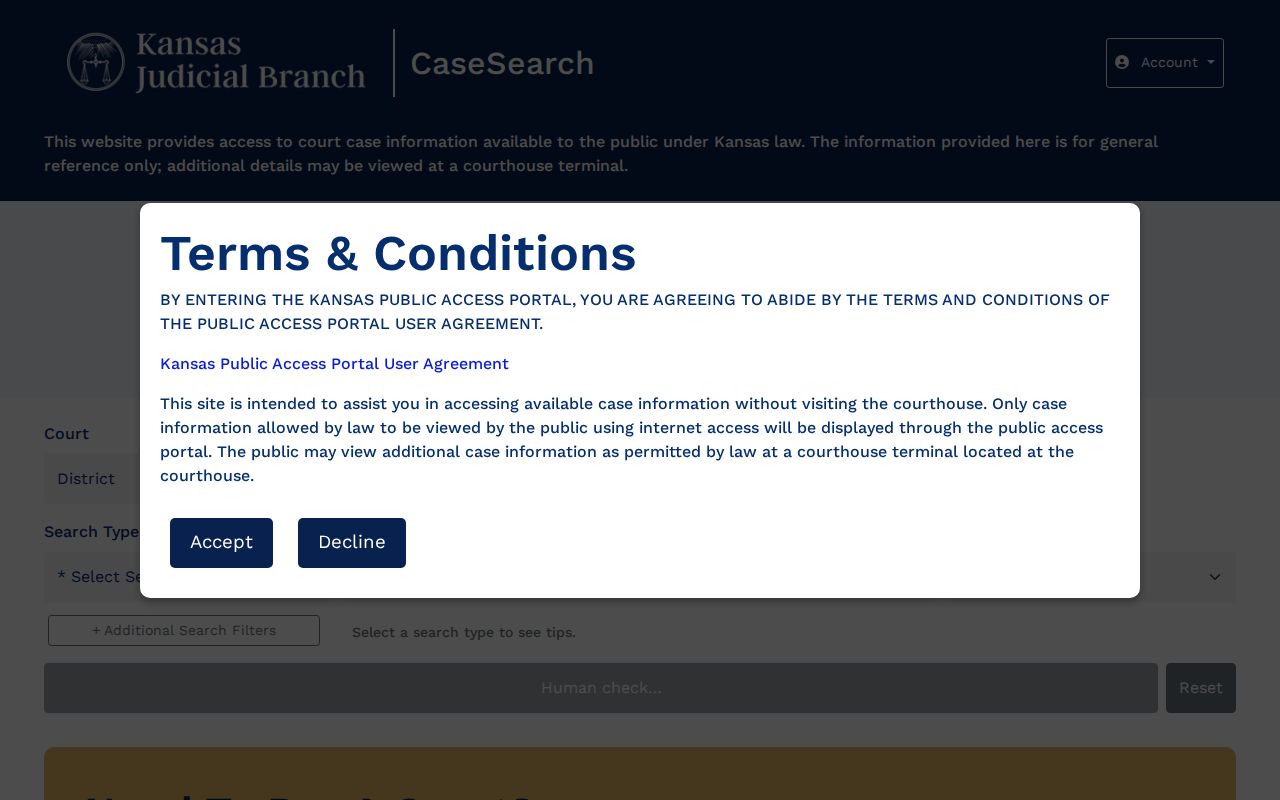
Use the form for a careful field-by-field search. It does not show a private result, and it is not proof that every court document is online.
Riley County Docket Search Terminal
A search station at the courthouse gives you a second way into Riley County court records. Kansas Rule 22 allows the public view at the terminal to run broader than what appears online. That gap matters for older converted files and public documents that lack a portal image. It also matters when you want a search confirmed in the court's own system.
Bring the case number, party name, and likely case type to the Riley County Courthouse at 100 Courthouse Plaza. The public computers there allow a search by name or number. Clerks can steer you to the right access channel. Still, K.S.A. 20-3133 bars staff from answering legal questions, such as whether a judgment is still current. So ask for the record and its entries, not a legal conclusion.
Which Cases Stay Restricted
When a Riley County docket search comes back empty, several things could be behind it. The case number format may be wrong. The case might sit in a municipal court. It may predate the web document range. It could also fall into an excluded or restricted category. Kansas guidance lists adoptions as a common limit. So are many juvenile and child-in-need-of-care matters, grand-jury material, search warrants, and expunged criminal records.
Rule 22 draws three lines. One is internet-public information. One is public material at a courthouse terminal. The last is nonpublic material you cannot reach through either channel. Sealing procedure is governed by Rule 23. A KORA request cannot break a seal or any other exemption. If a known case will not appear, recheck the full number and the correct court. Try the old Riley format when it applies, and use the terminal. Then ask the clerk which lawful access route fits your case lookup.